Catalog, ready to work
Products, categories, brands, variants, units and conversions. Keep codes, pictures, attributes and price lists organized.
Version 1.3.0 · Free & open source
Know what you have. See what needs attention. Move every order forward—from the first receipt to the final dispatch. Inventory and warehouse management with a Persian/English interface, simple daily workflows and advanced controls when you need them.
✓ Free & open source ✓ Local-first ✓ Two languages
BUILT AROUND THE WORK
Keep the catalog, warehouse tasks and order progress connected. Clear next steps help everyday users stay focused.
Products, categories, brands, variants, units and conversions. Keep codes, pictures, attributes and price lists organized.
Multiple warehouses and bins, stock movements, reservations, reorder thresholds, transfers and in-transit receipts.
Barcode and QR labels, serial numbers, batches and expiry dates. Allocate stock using FIFO or FEFO.
Purchase requests and approvals, partial receipts, sales orders, picking, package contents, dispatch and inspected returns.
Low-stock and expiry alerts, aging and movement reports, CSV/XLSX exchange and scheduled daily reports saved to disk.
Individual users, custom roles, warehouse restrictions, activity history, backup/restore and API keys.
Your working database stays on your PC.
Persian & English. RTL & LTR.
Simple and professional interface modes.
LESS GUESSWORK, CLEARER NEXT STEPS
Start with the daily actions. Turn on professional mode as your process grows.
Record arrivals, location, quantity and tracking details.
Allocate available stock and verify picks by barcode.
Assign contents to parcels and send full or partial orders.
Inspect returns, count stock and review reorder suggestions.
Screenshots
Task-focused dashboard, clear stock status and quick access to receiving, issuing and transfers. Switch between the two actual app themes below.
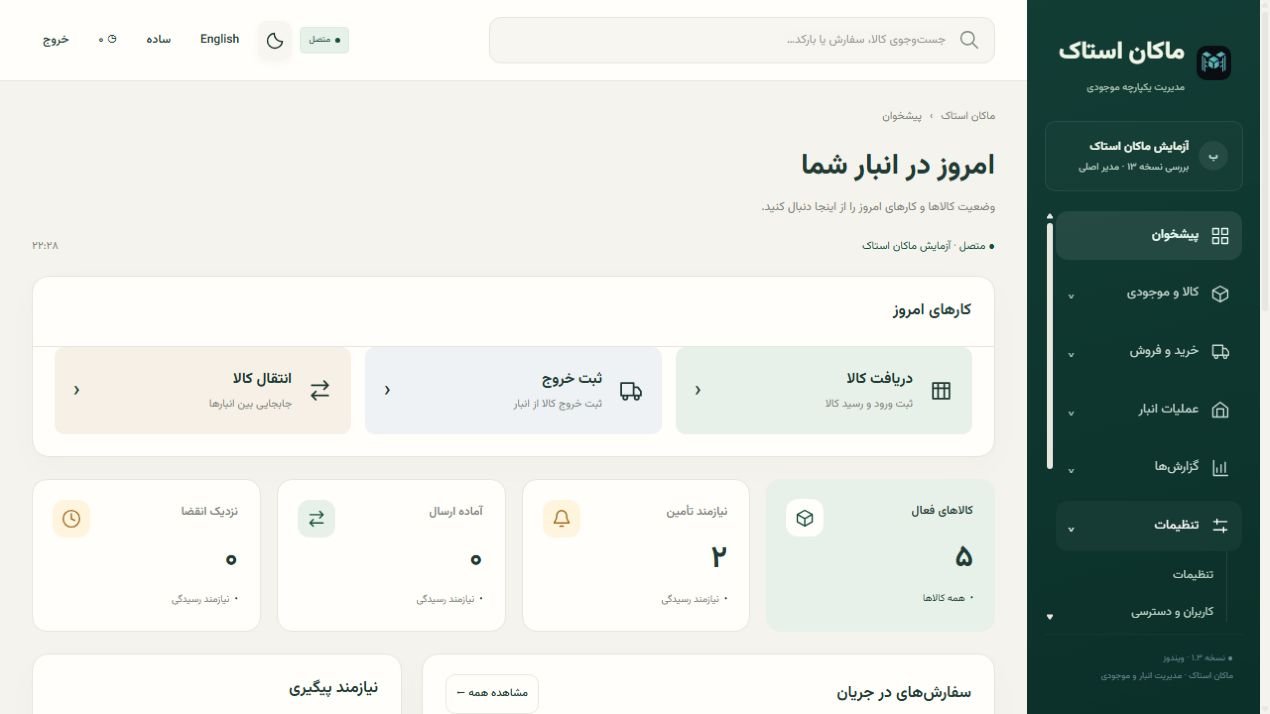
OPEN ABOUT WHAT IS INCLUDED
This release is designed for evaluation by small and medium teams. The full feature matrix separates implemented, partial and planned capabilities.
Downloads
The Windows packages include Node.js and SQLite. No separate runtime, database installation or paid hosting is needed for local use.
The simplest start. Per-user installation, desktop and Start menu shortcuts, and an uninstaller. The Persian guide is offered at the end of installation.
MAKAN-STOCK-Setup-1.3.0-Windows-x64.exe
07cf74f34904ed96bc7af6da31b1f297f621e8cd12725acef4b9edebd117b0d3Extract the entire ZIP into a writable folder and run MAKAN-STOCK.exe. Keep the whole folder together.
MAKAN-STOCK-1.3.0-Windows-x64-Portable.zip
9c995d1a634f71d63359eab7ca86c81d86978a26b17567e137a583c6bf5cecf7Original application source under MIT, tests, documentation and Windows build definitions. Node runtime binaries are excluded.
MAKAN-STOCK-1.3.0-Source.zip
35 pages covering setup, daily work, data, roles, backup and deployment. Manual language: Persian.
Open PDF guidePDF · 159 KBVersion 1.3.0 · Windows 10/11 x64 · Unsigned installer. The first launch asks you to create an owner account. No default credentials or customer database are shipped.
Verify your download: Get-FileHash .\MAKAN-STOCK-Setup-1.3.0-Windows-x64.exe
· Release notes ↗
· All release files on GitHub ↗
· Read documentation ↗
BEFORE YOU START
In a local SQLite database. The default installed path is %LOCALAPPDATA%\AnbarOne\data\inventory.sqlite; the portable edition uses data\inventory.sqlite beside the application. The legacy AnbarOne path is retained for compatibility.
Yes, individual accounts, custom roles and warehouse restrictions are supported. Default startup is local to one PC. Shared access from other PCs or phones requires a separately configured server with trusted HTTPS. There is no enforced seat-license limit, but concurrent capacity has not been benchmarked or guaranteed.
Local use does not need an Internet connection. Mobile devices need access to the shared server. The limited offline queue covers receiving, issuing, transfers and stock-count sheets; pending operations are not committed until the server validates them, and conflicts need review.
This release has a responsive web interface and PWA/warehouse mode, not a separate native mobile app. Camera scanning depends on the browser and hardware; keyboard-style scanners and manual code entry are alternatives.
Run the Windows installer, or fully extract the portable ZIP. Create your owner account at first launch; sample data is optional. Back up before upgrading. Installation upgrades and uninstall preserve user-generated data. Closing the browser does not stop the background service; use the Stop shortcut or Stop-AnbarOne.cmd.
The release passed 65 automated tests, plus Windows installer/upgrade/uninstall and extracted portable checks. The installer is not commercially code-signed. SQLite is not internally encrypted. Real multi-device HTTPS deployment, enterprise load, external integrations and physical scanner compatibility require validation in your environment.

Open-source software for practical work.
Original application source: MIT. Bundled components retain their own licenses.